Controller input translation utility
Xbox 360 Controller Emulator is a free configuration tool that enables non-Xbox controllers to communicate with PC games through XInput translation. It converts signals from DirectInput-based devices, such as legacy gamepads, flight sticks, or racing wheels, into inputs recognized as those of an Xbox 360 controller.
Top Recommended Alternative

Xbox 360 Controller Emulator operates by creating and managing xinput.dll files within the target game’s directory. Through this mechanism, it aligns button layouts, axis responses, and vibration feedback parameters with XInput standards required by many modern titles. The emulator includes an online database for sharing profiles and supports customizable profiles for multiple controllers.
Emulation and configuration framework
Xbox 360 Controller Emulator operates by intercepting controller input data and remapping it according to the XInput interface. It generates dynamic configuration files (x360ce.ini) that define mappings between device axes, buttons, and triggers. You can edit these parameters to match their hardware layouts. The emulator distinguishes between multiple connected devices, allowing configuration for each controller through a unified interface that reflects the standard Xbox 360 layout visually within the software.
The program includes profile management tools for saving and loading controller setups across different games. Each configuration file can be manually adjusted or generated through the automatic detection feature, which identifies connected devices and assigns provisional mappings. However, functionality is not guaranteed with anti-cheat-protected titles. This structure supports both single and multi-controller arrangements, facilitating game-specific configuration without modifying global input settings.
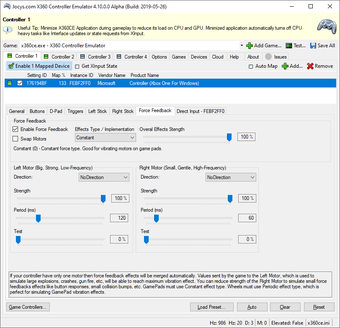
Additional configuration options extend to force feedback calibration and dead zone adjustment. The emulator allows modification of vibration strength and trigger responses, aligning tactile feedback to expected Xbox 360 controller standards. Axis inversion, sensitivity tuning, and trigger range scaling are available to refine input signals. These settings are stored in accessible text-based configuration files, which can be backed up or shared across installations for consistency.
XInput bridge
Xbox 360 Controller Emulator converts DirectInput signals into XInput output to ensure controller recognition in games requiring Xbox controller input. It includes mapping, vibration, and input calibration tools, along with per-device profiles and manual configuration options. While it supports a wide range of controllers, functionality depends on proper configuration and compatibility with individual titles. The emulator remains focused on translating hardware input rather than modifying gameplay functions or graphics settings.